Physical Address
304 North Cardinal St.
Dorchester Center, MA 02124
Physical Address
304 North Cardinal St.
Dorchester Center, MA 02124

Getting started with Google’s cutting-edge AI models doesn’t have to break the bank. I recently discovered how to claim $300 in free credits for Google AI Studio, specifically to explore their flagship image generation model – Nano Banana Pro. Let me walk you through the entire process and share my hands-on experience with Nano Banana Pro.
Before diving into the credit application process, let’s talk about why Nano Banana Pro is worth your time. This isn’t just another AI image generator. Google’s latest offering combines lightning-fast processing with professional-grade output quality that rivals industry leaders.
What makes this model special? It’s the perfect balance of speed, control, and integration. Unlike other platforms where you’re stuck with basic settings, it gives you granular control over every aspect of image generation and editing.
When you land on Google AI Studio’s homepage, you’ll immediately spot the prominent “Try Nano Banana Pro” button. Google clearly positions this as their flagship offering, and for good reason.
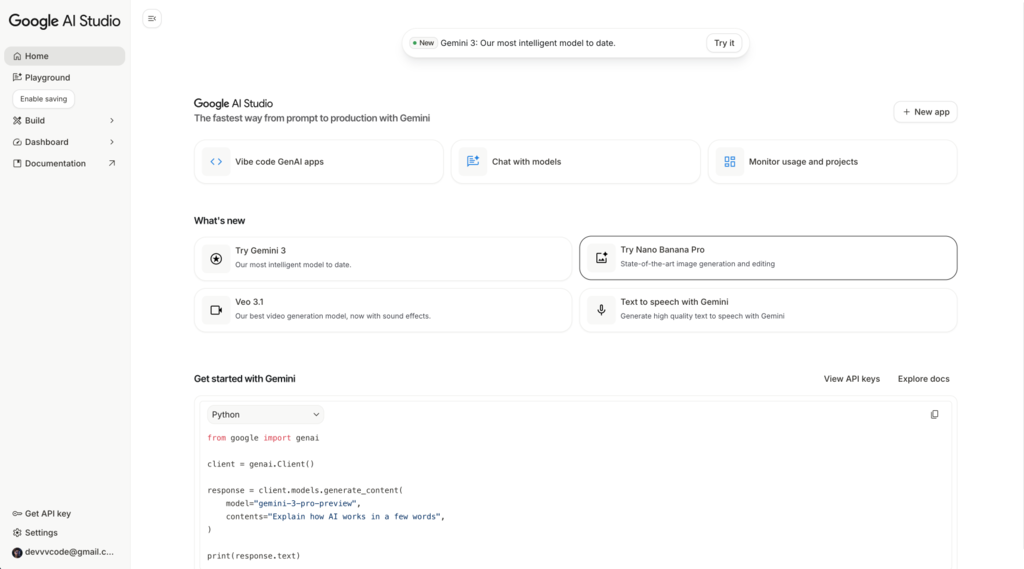
The interface design is clean and intuitive. You can see the model featured alongside other powerful tools like Gemini 3 and Veo 3.1, but it gets prime real estate on the homepage. This tells you everything about Google’s confidence in this technology.
The homepage layout makes it crystal clear that this is their current powerhouse for image generation and editing tasks. The positioning isn’t accidental – Google wants you to try this model first.
Here’s where things get interesting. Unlike some AI platforms that offer limited free trials, Nano Banana Pro requires proper API setup from day one. Don’t let this scare you off – there’s a good reason for this approach.
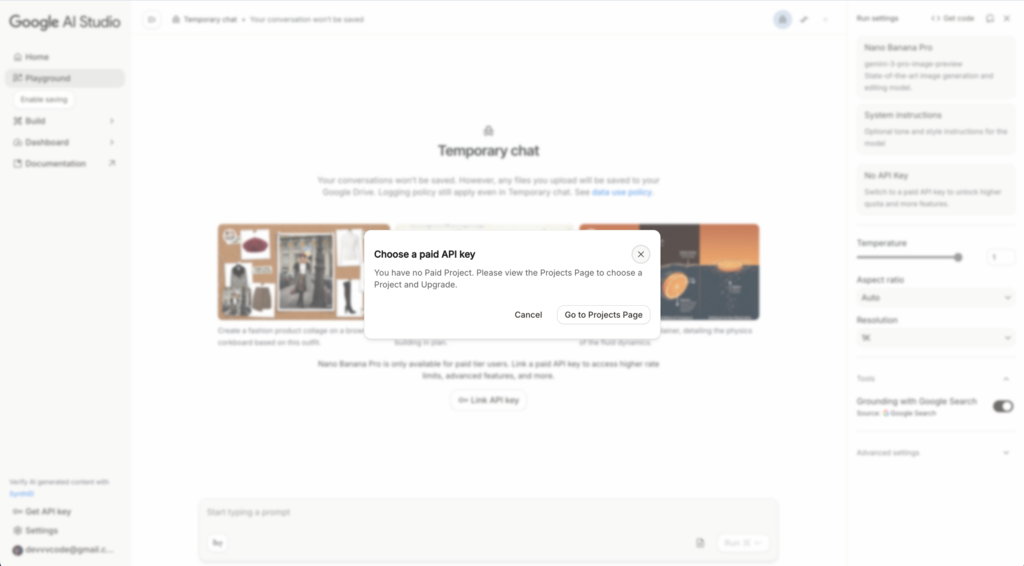
When you click to try the service, the system immediately prompts you to set up a paid API key. This might seem like a barrier, but it’s actually smart design. Google is being upfront about the computational power these models require.
The key detail? You get $300 in free credits immediately. That’s not a trial – that’s serious money to explore what this powerful tool can do without any financial risk.
I created a dedicated project called “WebFV Project” for my experiments. The project creation process is straightforward, but let me share the details that matter.
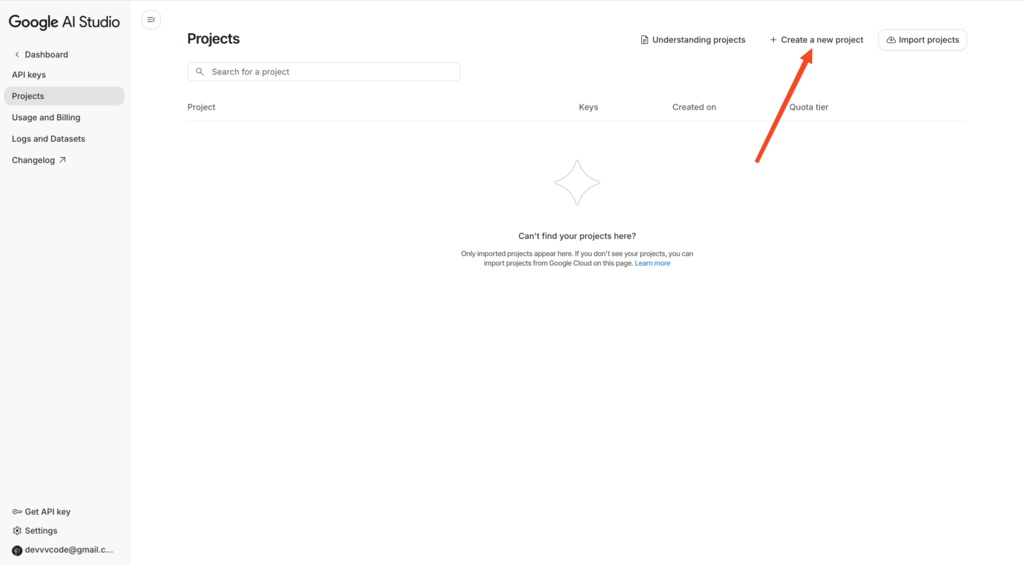
The project setup dialog guides you through each step methodically. Google doesn’t rush you through this process, which I appreciate. You’re making decisions that will affect how you interact with the platform, so take your time here.
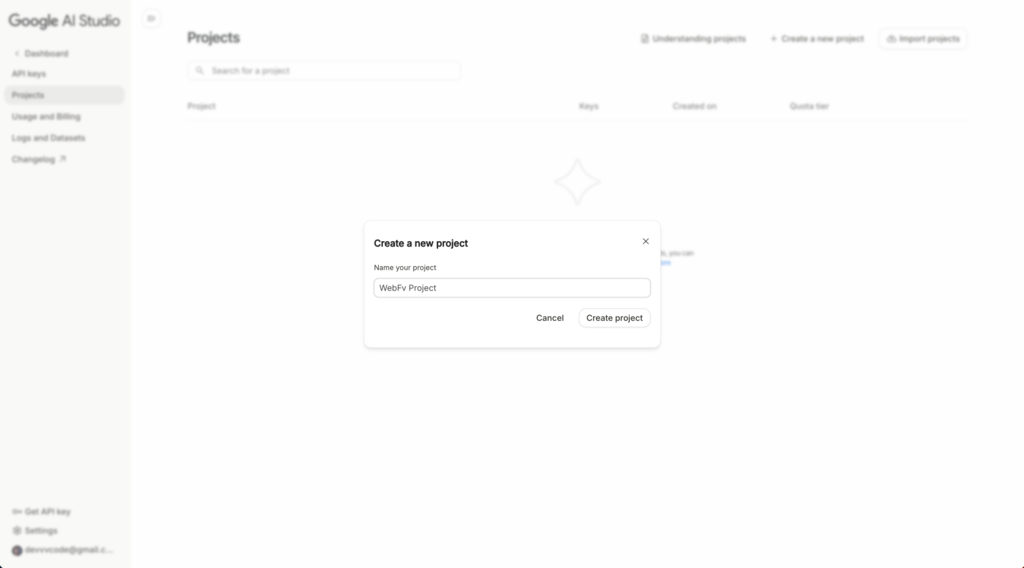
Once you’ve named your project, you’ll see the setup interface. This is where the real magic begins. You’re not just creating a folder – you’re establishing your gateway to the AI ecosystem and Google’s powerful tools.
The API key creation process is more straightforward than you might expect. Google provides clear instructions, and the interface explains exactly what permissions you’re granting.
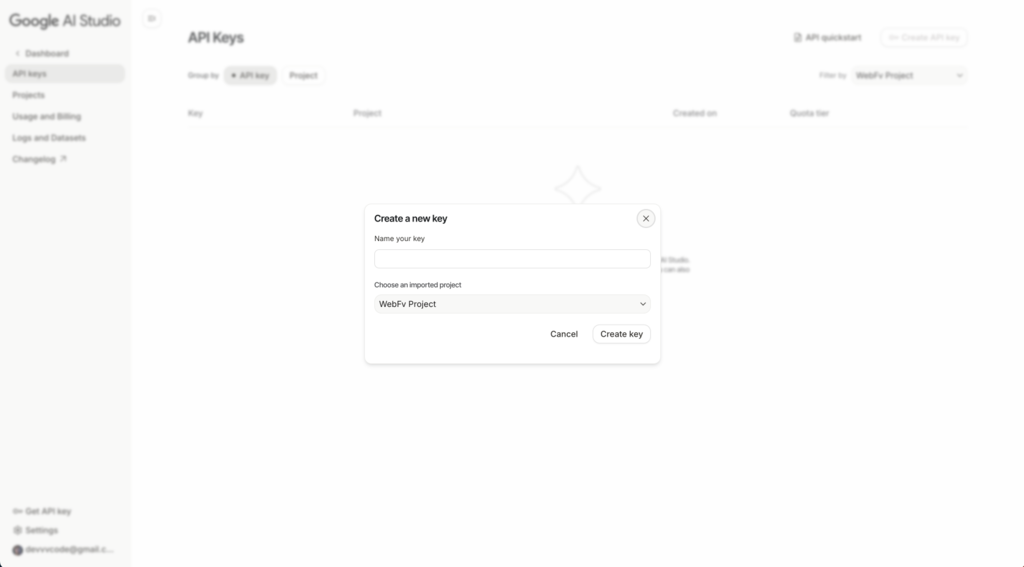
What I loved about this step is the transparency. Google clearly explains how your key will be used specifically for platform access. There are no hidden permissions or vague terms. You know exactly what you’re signing up for.
The interface shows you different access levels and usage scenarios. For most users exploring the service, the standard API key provides everything you need to get started.
Now comes the part that might give you pause. Yes, you need to add a payment method to access the service. But here’s the game-changer – Google immediately credits your account with $300.
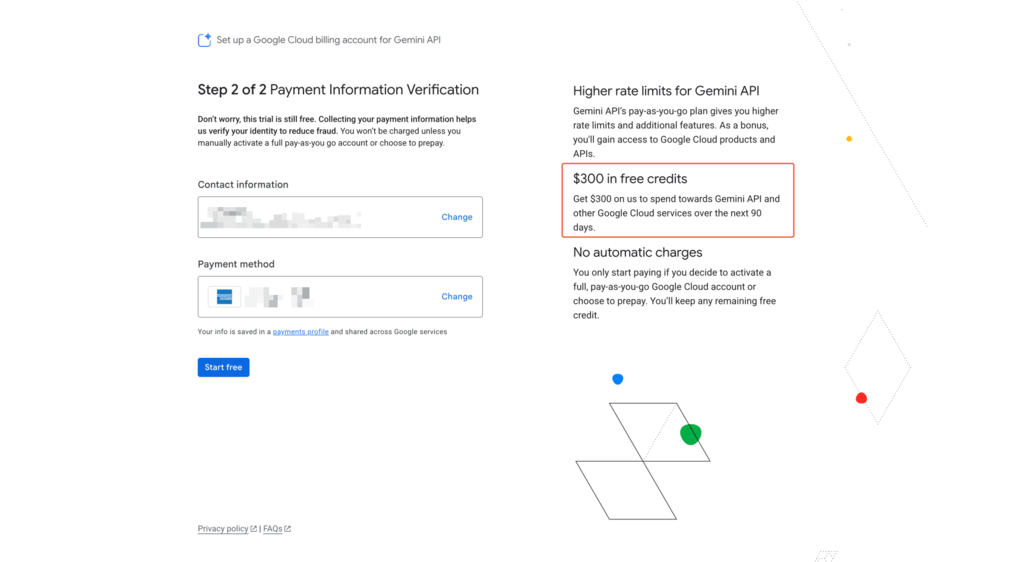
This billing setup interface is where the magic happens. You’ll add your payment information, but Google’s $300 credit means you won’t be charged for quite some time. That’s enough budget to thoroughly test the platform and understand its capabilities.
I found this approach refreshingly honest. Instead of offering a limited “trial” that leaves you wondering about real-world performance, you get full access to Nano Banana Pro with generous free credits. You’re experiencing the actual service, not a watered-down version.
Once everything’s configured, linking your API key feels almost anticlimactic after all the setup. The system recognizes your credentials automatically.
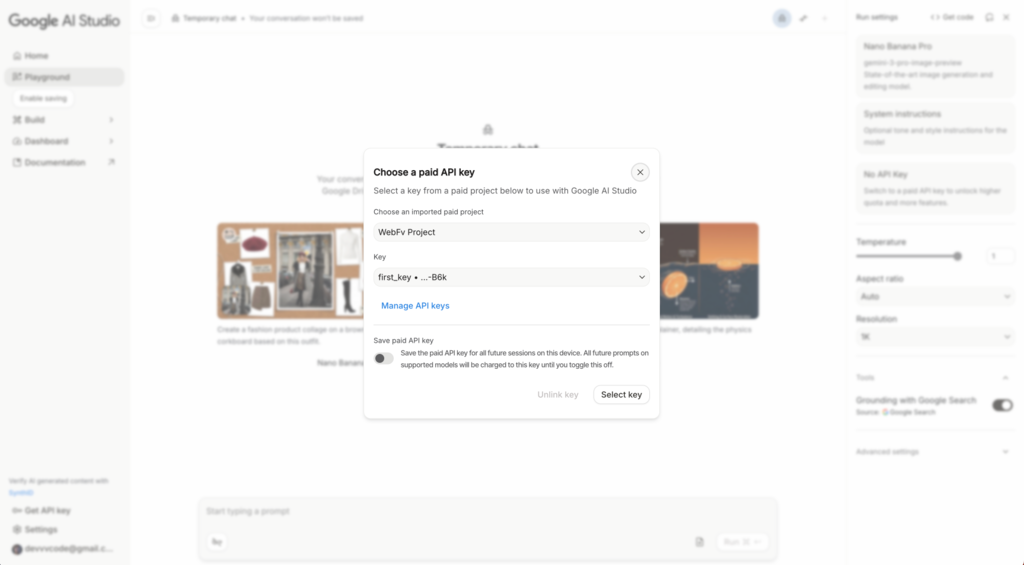
This success screen confirms you’re ready to explore what the platform can really do. The setup process might seem involved, but each step ensures you have full access to its capabilities.
This is where Nano Banana Pro truly shines. The working interface feels professional without being overwhelming. You get enough control to achieve precisely what you’re envisioning, but you’re not drowning in options.
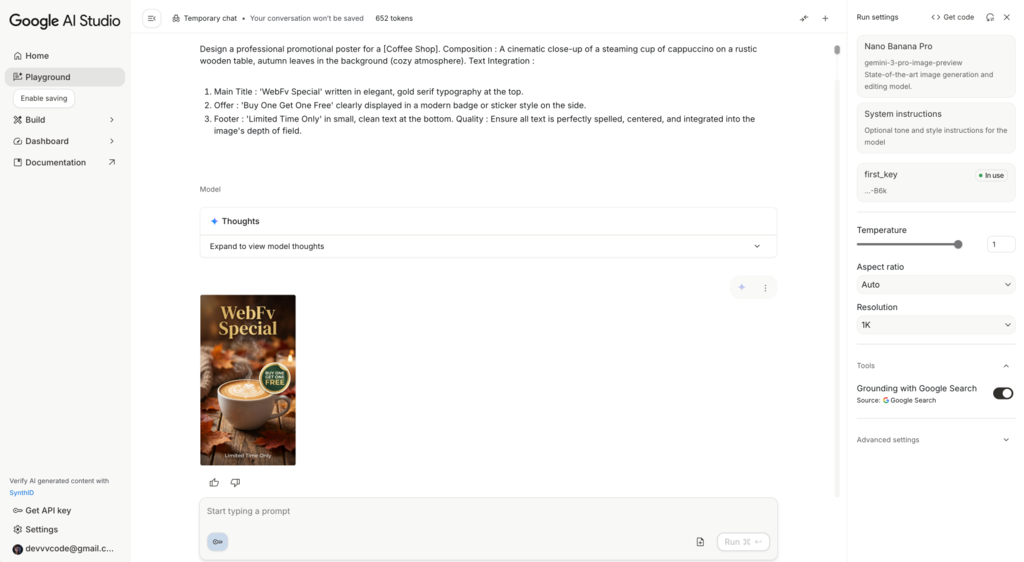
The generation speed surprised me most. The platform delivers high-quality results faster than I expected. We’re talking about professional-grade images generated in seconds, not minutes.
What sets Nano Banana Pro apart from other AI image tools? The level of control. You’re not just typing prompts and hoping for the best. Nano Banana Pro gives you granular control over the editing process, making it feel more like professional design software than a simple AI tool.
Speed Meets Quality: The balance here is exceptional. You get high-quality outputs without the lengthy wait times that plague competing platforms.
Ecosystem Integration: Being part of Google AI Studio means the platform plays nicely with other Google AI tools. If you’re already using Gemini or other Google AI services, the workflow integration is seamless.
Professional Control: Unlike AI image tools that feel like black boxes, this service gives you granular control over the generation process. You can refine and adjust with precision.
Setup Complexity: While the $300 credit is generous, requiring billing setup upfront might deter casual users who just want to experiment with the platform.
Learning Curve: The depth of the service means there’s definitely a learning curve to maximize its potential. It’s not quite as plug-and-play as some alternatives.
Based on my extensive testing, Nano Banana Pro excels in several scenarios:
Professional Design Work: If you need high-quality images for commercial projects, the output quality justifies the setup effort.
Iterative Creative Processes: The editing capabilities make this platform perfect for refining and adjusting images through multiple iterations.
Integration Projects: When building applications that need to integrate with Google’s AI ecosystem, it becomes the obvious choice.
What I discovered during my journey is an active community sharing techniques and approaches. There are excellent open-source prompt collections designed specifically for the platform:
These resources saved me hours of trial and error. They’re constantly updated with new techniques for getting the most out of Nano Banana Pro.
After spending significant time with Nano Banana Pro on Google AI Studio, I can confidently say it’s a solid addition to any AI toolkit. The initial setup might feel like a commitment, but the $300 free credit gives you plenty of runway to evaluate whether it fits your needs.
The image quality and generation speed make this platform competitive with industry leaders, while the Google ecosystem integration adds value if you’re already invested in their platform.
For professionals working on image-heavy projects, the service delivers the reliability and quality you need. For hobbyists, the setup process might feel excessive, but the free credits make it risk-free to explore.
Whether you’re generating marketing materials, creating artistic projects, or building AI-powered applications, the platform provides the tools and quality to execute your vision effectively.
My advice? Take advantage of those free credits and see for yourself what Nano Banana Pro can do. The learning curve is real, but the community resources and intuitive interface make it manageable. Nano Banana Pro isn’t just another AI tool – it’s a professional-grade solution that’s accessible to everyone willing to invest the setup time.